
- Editorial5.00
- Trustpilot3.50 (5.5k reviews)
- App Store4.60 (680 reviews)
- Google Play4.60 (58.4k reviews)
 Score4.54
Sky Bet Ireland Review (2026): Our Tests & Real Player Ratings
Sky Bet was officially launched under its current brand name in 2002 and has gone on to become one of the leading Irish and UK betting operators.
In this review, we put the site to the test by signing up, verifying our account, depositing real money, placing bets and withdrawing funds.
Our unique BL Score also combines real user tests from Trustpilot, app stores and the editorial team to give a full, honest look at SkyBet.

| Betting Margins (Average) | 7% |
|---|---|
| Min Deposit | €5 |
| App Availability | App Store, Google Play |
| Payment Methods |     |
| Sportsbook | Flutter |
|---|---|
| Betting Margins (Average) | 7% |
| Racing Markets |
Yes
|
| Bet Builder |
Yes
|
| Live Streaming |
Yes
|
| Early Payout |
Yes
|
| Cash Out |
Yes
|
| Best Odds Guaranteed |
Yes
|
| Acca Insurance |
Yes
|
- Lots of value with promotions
- Customer support is great
- Instant withdrawals
- Has special markets
- Poor market depth in horse racing
- Sky Bet Games doesn't load properly
| Min Deposit | €5 |
|---|---|
| Fee | No fee |
| Min Withdrawal | €0.01 |
| Fee | No fee |
-
 Visa
Visa -
 Mastercard
 -
 Apple Pay
 -
 Instant Bank Transfer
| Support Methods | |
|---|---|
| Opening Hours | 7 days a week: 08:00 - 10:00 |
| Has FAQ |
Yes
|
| Licence | GRAI (1069-RB-26-0001) |
|---|---|
| Owner | Flutter Entertainment |
| Founded | 2002 |
Sky Bet Overall Score
| Bonus | 5 |
|---|---|
| Sportsbook | 4 |
| Casino | 3 |
| Customer Support | 5 |
| Payment Methods | 3 |
| Licence & Safety | 5 |
| Design and User Experience | 5 |
| Overall | 5 |
We were highly impressed with Sky Bet. It is always a little bit deflating when we see only two available payment options, but Revolut was hidden amongst them, making it three. Instant deposits and withdrawals were the talking point after our test.
We requested a withdrawal of €20 which processed straight away and the funds landed in our account in less than a minute. Min deposits and withdrawals are low.
Navigation was another plus point from our review. Compared to other operators, it was very easy to slide from sport to sport, market to market, or find the wide array of offers and promos on show.
Whether it was a price boost, extra place offer or early payout we wanted, all the promotions are there right in front of you.
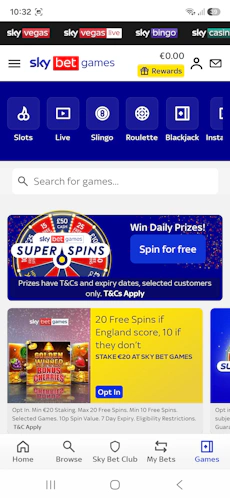
We were less impressed with the Sky Bet Games or Sky Bet Casino section. The former showed some technical glitches and loading problems while the latter had to be downloaded on a separate app to the sports betting app.
In terms of betting margins, with an average of just over 7% on Premier League games, we rate Sky Bet highly amongst its competitors.
About Sky Bet
Sky Bet was originally founded in 2000, but rebranded under its current guise in 2002. In 2020, Flutter Entertainment engaged in a £10bn merger with the Stars Group, thus adding Sky Bet to its online betting army.
Other brands under the same umbrella include Paddy Power and Betfair, so we are talking about a betting giant here. As such, it's perhaps no surprise to hear that Sky Bet is working with multiple odds providers, combining in-house ones with services from partners like Genius Sports and Amelco.
Sky Bet is also known for free-to-play prediction games like Super 6, and features like Acca Freeze and Request-a-Bet. Not to mention that the English Football League is sponsored by the bookie, which is why the Championship is known as Sky Bet Champions, for example.
Is Sky Bet Safe and Legit?
🔒 Sky Bet's GRAI Licence: GRAI-1069-RB-26-0001
Sky Bet is licensed under the Gambling Regulatory Authority of Ireland (GRAI-1069-RB-26-0001), the Malta Gaming Authority (MGA/B2C/1111/2025), and the UK Gambling Commission (licence number 65519). It has passed the checks in three places, which is always a good sign.
📊 Sky Bet's Trustpilot Rating: 3.5/5
Sky Bet's Trustpilot rating is a relatively high 3.5/5 from over 5.5k reviews. When compared to several other big-name betting operators, such as Bet365, Sky Bet is miles ahead and that does say something about the quality.
💰 Has Sky Bet Been Fined?
In 2022, Sky Bet was fined £1.17m by the UK Gambling Commission for erroneously sending promotional emails to over 41,000 self-excluded customers and nearly 250,000 unsubscribed users. Admittedly, that's not a good look, but hopefully the bookie has learned from the mistakes.
Sky Bet Deposits
You may expect a big-name bookie to offer several payment methods, but Sky Bet has taken a different approach here. During our testing, we could only deposit with Visa, Mastercard, and bank transfer, although we also confirmed that Apple Pay is available (just not for our Android device).
Revolut can be found by going through the bank transfer option (as any other bank), but this is not the same as the one-click Revolut deposits, which also goes by the name of Revolut Pay.
Default deposit limits were set on our account by debit card or normal bank transfer, but these were not disclosed. However, with Revolut banking, the maximum we could deposit was €5k. The minimum deposit for all methods available is €5, which is nice and low.
For us, depositing was not a problem once the verification process was complete. We would like to see more payment solutions added, though the speed and popularity of the payment methods on show make up for this somewhat. As does the minimum amount.
| Payment Method | Min Deposit | Max Deposit | Deposit Fee | Processing Time | Triggers Bonus |
|---|---|---|---|---|---|
 Visa | €5 | Not specified | No fee | Instant | |
 Mastercard | €5 | Not specified | No fee | Instant | |
 Apple Pay | €5 | Not specified | No fee | Instant | |
 Instant Bank Transfer | €5 | Not specified | No fee | Instant |
How to Deposit at Sky Bet
It's easy to make a deposit with Sky Bet. Have a look at our deposit guide below:
-
Click on the Head and Shoulders Icon
Once logged into your Sky Bet account, click on the 'head and shoulders' icon located beside your balance in the top right corner of the screen.

-
Hit the 'Deposit' Button
Smash the deposit button at the top of your 'my account' page. Notice that at the bottom of the screen, there's a message saying that verification is needed before transactions can take place.

-
Select Payment Method
Once verified, Irish betting enthusiasts can toggle between debit card and bank transfer when choosing a preferred payment method. Revolut banking is also accepted on these shores.

-
Enter Your Payment Details and Amount
As with any card payment, you will now need to declare your payment details. Once entered, type your desired deposit amount into the box provided.
The 'Deposit' button at the bottom of the page will then turn black. Hit it.

-
Sky Bet Deposit Confirmed
You will now see confirmation of your deposit and your balance will be topped up. Click the 'Start Betting' button.

Sky Bet Withdrawals
Most bookies will limit withdrawal methods to those from which you have previously deposited funds. Sky Bet is no different, meaning we could only withdraw back to our Visa debit card. Theoretically, though, you can also withdraw with Mastercard, Apple Pay, and bank transfer.
The minimum amount we could withdraw was a very surprising €0.01. I have not personally come across this too often, although it should be noted that the minimum is slightly higher for bank transfers ay €5. The maximum withdrawal by Visa debit card is €35k.
The withdrawal process is automated for smaller amounts. In our test, we requested a withdrawal of €20 by Visa and we got a message right away saying that funds should already be in our account, or if not they will be within two hours.
Happy days, we checked our bank account and the cash had indeed landed instantly! Sky Bet is well and truly one of the fastest withdrawal bookies.
| Payment Method | Min Withdrawal | Max Withdrawal | Withdrawal Fee | Withdrawal Time |
|---|---|---|---|---|
| Visa | €0.01 | €35 | No fee | Instant in our test |
| Mastercard | €0.01 | €35k | No fee | 1-3 business days |
| Apple Pay | €0.01 | Not specified | No fee | 1-3 business days |
| Instant Bank Transfer | €5 | Not specified | No fee | Within 24 hours |
How to Withdraw Funds From Sky Bet
Below, we go through the simple step-by-step withdrawal process at Sky Bet:
-
Go to Your Sky Bet Account
Making sure you are first logged into your account, open up your banking section by clicking the head and shoulders icon in the top right corner.

-
Choose the "Withdraw" Option
Hit the big black "Withdraw" button which should be visible at the top of your screen.

-
Enter the Withdrawal Amount
There is now a page with your pre-populated preferred payment option. At Sky Bet, bettors must withdraw to the same method until transactions are balanced out (see the net deposits link).
Enter your desired withdrawal amount and hit "Withdraw".

-
Sky Bet Withdrawal Receipt
You will now see a withdrawal success receipt claiming funds have already landed in your account, or if not they will be there within two hours. In our most recent test, it was indeed an instant transfer. Click on OK to start betting.

Sky Bet Sportsbook Review
Sky Bet is well known to punters all over the UK and Ireland, so we were expecting no less than the full experience in our review. Now powered by Flutter Entertainment, and with a platform of nearly 30 sports courtesy of Amelco, we were happy to tuck in.
⚽ Football Offering
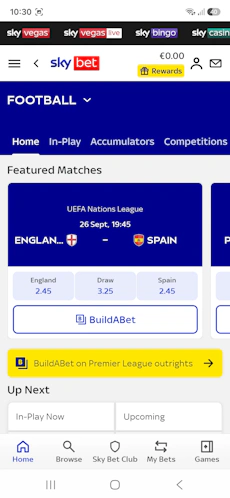
First things first and that's footy! There's a lovely neatly laid out menu in Sky Bet's football product. If we click the 'competitions' tab, we see all the English competitions, starting (obviously) with the Premier League.
As we scroll down the menu, we delve into the depths of European football, and even the Irish Premier Division and the best of Women's footy. Keep going and we can find football markets the world over, from Australia to El Salvador.
There's a dedicated specials column with price boosts and enhanced or pre-populated bet builders amidst the offerings. Footy promos include Acca Freeze and 2-up early payout. Bettors also have the Request-a-bet feature or cash out option to try out.
In terms of betting margins, we are talking just north of 7% for a standard Premier League game, which rates middle-of-the-road. Combined with the rest of the features mentioned above, it would be fair to say that the bookie still offers a lot of value.

🏇 Horse Racing Offering
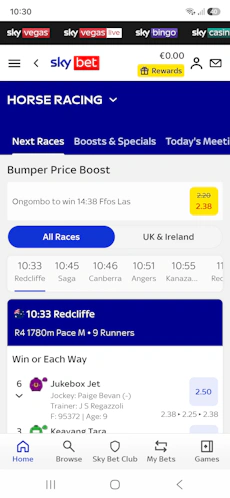
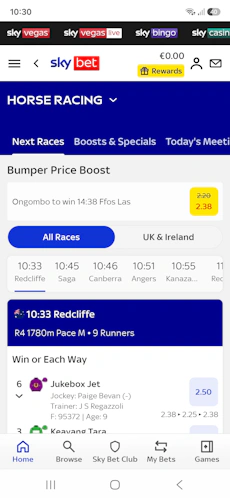
Horse racing at Sky Bet is rife with specials and promos. There is a 'Boosts and Specials' tab, while offers on individual races include extra places and Best Odds Guaranteed. BOG doesn't apply to extra place races.
There are Expert View and Live Streaming features, but the market depth on races outside of the big meetings is pretty thin, with just 'win or each way' betting available.
French, American and Aussie racing is covered in depth and bettors can also sample racing from Rome to Japan and Brazil.

🎾 The rest
There's a nice spread of sports and markets in the Sky Bet menu, ranging from American Football to Gaelic Games, greyhounds, MMA and even specials or novelty bets.
With almost 30 sports in all, market depth is more than satisfactory. The golf and tennis betting spreads are great for fans of the two sports.
Importantly, it's easy to find the sports and markets you want at Sky Bet. In our review, we felt that the browsing experience was seamless.
Sky Bet Casino Review
To check out the casino section of Sky Bet, we had the choice to play Sky Games, alternatively go to Sky Casino in the mobile browser or download a separate app.
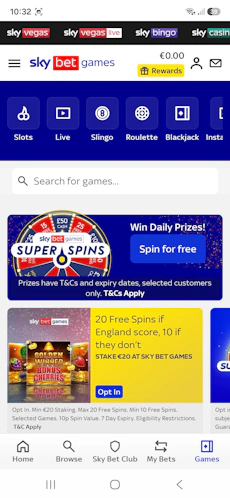
Two negatives here: we are not fans of different apps for both sports betting and casino. We also found that the lobby and games were not loading properly on Sky Games.

Sky Casino itself, albeit on mobile browser, was much easier on the eye. The interface is much cleaner, with a green and black colour scheme in place.
Toggle between slots, Live Casino, table games and more with ease. Filter by game type, theme, volatility, mechanics or return to player percentage (RTP %).
Sky Bet Mobile App
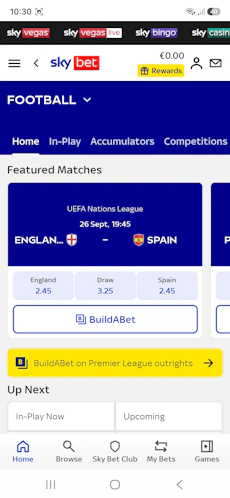
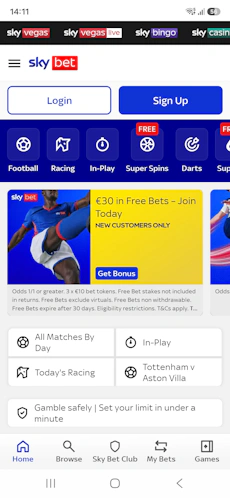
The mobile app is developed by Sky Betting and Gaming. It's a little on the large side at over 200MB.
On the Google Play Store, the Sky Bet app on Android is rated a more-than-solid 4.6/5 with a whopping 65k reviews. On the Apple App Store, the Sky Bet app again scored 4.6, but from 550 reviews or so.
It sounds strange that there aren't more on iOS, but we suspect the Android one is pulling from the UK too and not just Ireland. In any case, we definitely recommend downloading the app if you are looking to use Sky Bet for sports betting.
However, if casino is your thing, you should know that the Sky Bet sports betting app is separate from the Sky Bet full casino app, which is not ideal.
-
Sky Bet
Google Play App Store

Sky Bet Responsible Gambling
During our testing of the bookie, we noticed a 'Safer Gambling' link in the main menu. We clicked in here to see an array of betting tools:
- Deposit controls
- Transfer limit
- Reality checker
- Cool off
- Time limit
- Close my account
- Self exclusion
Underneath that, there are links and phone numbers to gambling help resources like GamCare, Gamban, Gordon Moody and the Samaritans.
We could also click the 'Message Us' button at the bottom of the page to talk directly to customer support, though we were greeted by a robotic AI agent initially (maybe not ideal for that purpose).
Sky Bet Customer Support
Visit the 'Help', 'Help and Support' or 'Contact Us' links or areas dotted around the site to get the attention of support staff.
There's an in-depth FAQ section on Sky Bet for any bettors who would like to dance around this.
Live chat is the main form of communication in terms of support. Initially, you will have to deal with an AI agent, but it is quite easy to be transferred to a member of staff. Hit the chat icon at the bottom right of the screen, if showing.
Alternatively, a phone number is one of multiple channels available. Phone Sky Bet on +353877962870 from 8 am to 10 pm seven days a week (same for live chat).
Email support can also be accessed via an email address or by using the feedback form.
| Live Chat |
Yes
|
|---|---|
| [email protected] | |
| Phone | +353877962870 |
| Opening Hours | 08:00 - 10:007 days a week |
How to Get Started at Sky Bet
The registration took us a little longer than the norm but it is still easy to get started at Sky Bet. Simply follow our instructions:
-
Navigate to Skybet.com and Hit 'Sign Up'
Navigate to Skybet.com using one of our dedicated links. Once there, you will see a blue "Sign Up" button located in the top right corner. Click it.

-
Enter Your Personal Information
Enter your first and last name. This is the first step of a longer registration process than normal for bookmakers.

-
Keep Filling in Account Details
Fill in all the personal details required by sliding from page to page using the arrow. These include:
- Name
- Date of birth
- Mobile phone number
- Address, including postcode
- Security question
- Pin number

-
Create Sky Bet Account
When you are done, there will be a promotions page where bettors can choose to opt-in or stay out of correspondence regarding promotions altogether.
Then, accept the T&Cs by ticking the appropriate box. Hit the "Create Account" button below and you are all set.

-
Sky Bet Registration Complete
Now, bettors will be sent back to the navigation with the option to set alerts, notifications, and biometric login.
Please note that verification via uploading security documents is required for Irish punters before deposits can be initiated.

More Sky Bet Guides


User Reviews
There are no reviews for Sky Bet